Syncing your ActivityWatch devices: what works today, what's next
You can now copy activity data between your phone and your computers without an ActivityWatch account. ActivityWatch has no sync server of its own; whether the copies stay on machines you control depends on the folder tool you pick. Sync and multi-device queries have reached the point where the basics work and Erik uses them on his own devices. They are not yet click-and-play: some setup is manual, and a few pieces — including the combined Activity view — are merged but not yet in a release. This post covers what works, what needs care, and what is still ahead.
How it works
ActivityWatch has no sync server. Each device keeps its own data locally, as it always has. aw-sync adds one step: it copies a device’s buckets into a sync folder, and it reads the other devices’ copies out of that folder.
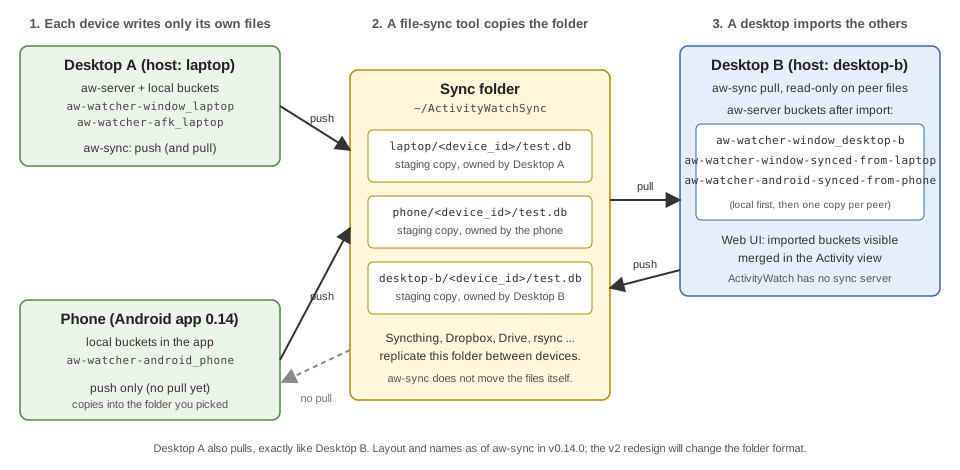
The sync data flow as it works in v0.14.0. Names and layout will change with the v2 redesign below. On a small screen, scroll sideways or open the diagram full-size.
The moving parts:
- Push. Every device writes only into files it owns: a staging database at
{hostname}/{device_id}/test.dbinside the sync folder (default~/ActivityWatchSyncon desktop). Nothing else writes to it. - Transport is your choice. Share the folder with a tool you already use. Syncthing, rsync, or a self-hosted share keep copies on machines you control. Dropbox or Google Drive also work, but then the folder copies go through that provider’s servers.
aw-syncdoes not move files between machines; that is deliberate, so you pick where your data travels. - Pull. A desktop opens the other devices’ databases read-only and imports their events into its own
aw-serveras buckets named likeaw-watcher-android-synced-from-<host>. - View. Once imported, the web UI can query local and imported buckets together. In v0.14.0 the Activity view can merge any set of devices: pick them in its device selector.
What works today
- Android pushes. In Android 0.14, Sync Settings lets you switch sync on (it is off by default) and pick a folder through Android’s storage picker. Since 0.14.2 it also shows when the next sync is scheduled and what each pass did.
- Desktop pulls.
aw-sync syncdoes one pull and push pass.aw-sync statusshows which peers it found in the folder and what the last pass did. - Multi-device queries. They exist in the web UI and have been fixed several times in the last few weeks, including for phones that have no AFK data. v0.14.0 ships an All devices / pick-devices selector in the Activity view (aw-webui#1004).
What needs care today
We would rather tell you than have you find out.
- It’s early. Sync is opt-in and not started by default, and setup is manual.
- Android does not pull yet. The phone sends its data out but does not import your desktops’ data (aw-android#291). The app’s own web UI therefore shows only the phone’s data.
- You trigger the desktop pull. The background daemon only pushes by default in v0.14.0; set
pull = trueunder[daemon]inaw-sync’sconfig.tomlto have it pull too. Runningaw-sync syncyourself or from a timer always does both. The sync docs cover setup. - The multi-device view covers apps and categories. Browser and stopwatch data stay single-device in that view.
- Some limits are built in. Settings are not synced, deleting an event does not propagate, and every device mirrors events from every other, so many devices means many copies and more disk. Early versions could import duplicate events;
aw-sync dedupe --dry-runreports them. - Imports are not read-only. Local edits to an imported bucket are silently lost (aw-server-rust#694). Edit on the device that owns the data.
What’s next
- A leaner staging area (sync v2). The staging database is the wrong shape for sync. Version 2 is designed to replace it with immutable, compressed segment files plus a manifest, with the goal of more predictable imports and less space used. The first piece, a segment writer, has merged behind a feature flag and is not used by any command yet. Design and progress are tracked in activitywatch#1445.
- Android pull. It is waiting on v2, so that mirroring every device’s data does not fill up phone storage.
- Finishing multi-device queries. Getting the web UI selector released, and making sure the clients, phone included, actually get multi-device data.
We are not putting dates on these.
Try it, and tell us what breaks
- Pick a folder and share it between your devices with a tool you trust. If you want copies to stay off third-party servers, use Syncthing, rsync, or a share you host.
- On the phone, turn on Sync in the navigation drawer and choose that folder.
- On the desktop, install v0.14.0 and run
aw-sync sync, then checkaw-sync status. - Confirm the import from
aw-sync status(it lists discovered peers) and from the raw buckets list or Timeline, which should show...-synced-from-<host>buckets. Then pick your devices in the Activity view’s device selector to see them together.
Expect the first pull to import everything already in the folder, which can take a while for a phone with months of history.
If something goes wrong, open an issue and include the aw-sync status output after redacting identifying peer names and paths, or ask on the forum. Reports from real setups are what makes this better.