A lighter faster ActivityWatch with Tauri: now available for testing
The ActivityWatch v0.14.0 release ships a new desktop app: aw-tauri, a lighter, faster cross-platform repackaging of ActivityWatch. As the name implies the project is built with Tauri, a relatively new Rust-based toolkit that enables easy development of small, fast, and secure applications with a great developer experience.
We first announced this work in 2024, when it was little more than a prototype. Since then it has grown into something you can install on Windows, macOS (Apple Silicon and Intel) and Linux, and v0.14.0 includes it for every one of those platforms. This post is the story so far: why we did it, what you get, and how you can try it today.
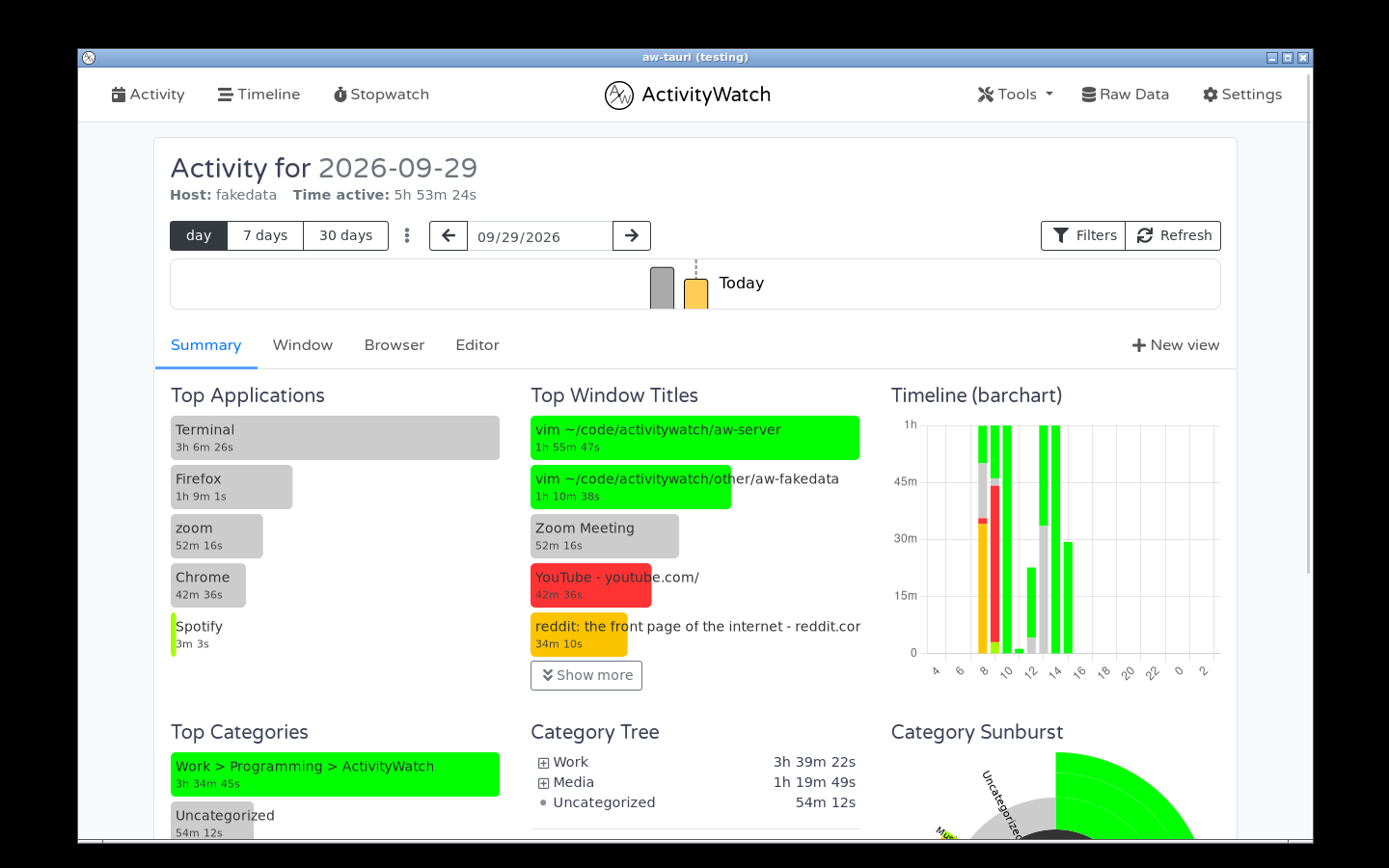
The Activity view inside aw-tauri's own window (v0.14.0b8, Linux; demo data). No browser tab needed.
Why Tauri
Tauri apps are lightweight, memory efficient and secure by design. Tauri does not ship a renderer but uses the platform native renderer via WebViews. This simple design choice makes the app size compact and memory efficient during runtime, as compared to electron apps. Tauri apps are secure, only interacting with the host systems through Tauri APIs.
That last part holds if you build an app the “Tauri way”. ActivityWatch also runs an HTTP server (aw-server-rust, on localhost:5600), so we still have to take precautions to not expose sensitive information to other devices on the network or to websites, just like before.
What you get
aw-tauri aims to replace the functionality that is currently implemented in aw-qt and aw-notify. Creating a new Rust-powered entrypoint for running ActivityWatch and its modules. With aw-server-rust as the default server, it leads to a reliable and highly performant application. Reliability and performance is very important for apps like ActivityWatch, which always run in the background and collect data that is otherwise lost.
aw-tauri is designed to be a drop-in replacement for aw-qt, and the main application that appears as a tray icon and manages the server and the watchers:
- It houses its own webview, no need to visit
http://localhost:5600in your browser anymore. - Watchers can be started and stopped right from the tray icon, just like in
aw-qt. Crashed modules are restarted automatically, with a backoff and a limit on retries. - The server runs inside the app (
aw-server-rust), so there is no separate server process to manage. - Autostart on login is built into the app and can be toggled from the tray menu, no need to set up systemd services for Linux users.
- Notifications:
aw-notifyhas since been rewritten in Rust, andaw-tauriruns it and shows its output as native desktop notifications, enabling configurable usage notifications (such as goals or alerts). - aw-sync is included in the bundles, but sync is still in preview: it is opt-in and not switched on by default.
- It can update itself: from v0.14.0 the built-in updater (wired up to GitHub Releases) updates the app on macOS and Linux. On Windows, install new versions manually for now.
The watchers themselves are still mostly the same ones as before: the Python aw-watcher-afk and aw-watcher-window for cross-platform compatibility. There is no cross-platform Rust watcher, yet. On Linux the bundle also includes awatcher, a Rust watcher that covers window and AFK tracking on both X11 and Wayland, which is why the v0.14.0 release notes list native Wayland support for the Tauri build.
aw-tauri does not replace the classic aw-qt build in v0.14.0: both are published side by side, and the release notes still label the Tauri distribution as experimental. We would like to hear how it works for you before that changes.
Developer Experience
aw-tauri is built with aw-server-rust serving the backend together with aw-webui. We have taken care to keep the codebase lean and clean, such that it takes very little time to get acquainted with the codebase.
In our current build process for Python modules like aw-qt, we rely heavily on PyInstaller for building into binaries. This has been an enduring source of problems, and many developer weeks (if not months) have been spent trying to work out all the issues over the years (especially macOS support, because of the need to codesign a very messy .app bundle).
With Tauri, they have handled most of the heavy lifting, and make it easy to produce working binaries for all target platforms. Much of this is simply due to Rust (avoids PyInstaller and its complexity), but also the added tooling for codesigning, and producing suitable bundles for each platform: on Linux you get a lightweight .AppImage, on Windows an installer, and .app on macOS.
In v0.14.0, the Windows installer is an .exe setup, macOS gets a .dmg for both Apple Silicon and Intel, and Linux gets .AppImage, .deb, .rpm and .zip for x86_64 and arm64.
The Tauri bundles are also smaller to download. Here is the size of the installers attached to the v0.14.0b8 release, for the classic build and the Tauri build:
| Installer | Classic (aw-qt) |
Tauri |
|---|---|---|
Windows .exe |
81 MB | 43 MB |
macOS Apple Silicon .dmg |
64 MB | 53 MB |
macOS Intel .dmg |
70 MB | 56 MB |
These are download sizes read from the release assets, not a measurement of runtime memory use. We have not benchmarked memory yet.
Try it today
v0.14.0 includes aw-tauri builds for all platforms. Find them under “Tauri distribution” in the v0.14.0 release notes and assets. (The downloads page links the classic aw-qt build by default.)
- Windows: the
.exeinstaller. - macOS: the
.dmg, for either Apple Silicon or Intel. - Linux: the standalone
.AppImage,.deband.rpmare self-contained withawatcher(window and AFK tracking on X11 and Wayland) plusaw-sync. The.zipincludes those modules too, along with the Python watchers andmove-to-aw-modules.shfor installing optional modules in~/aw-modules/.
A few caveats, since this is still testing:
- Back up your data before upgrading. The v0.14 server performs a one-time database index migration on first start. It does not intentionally change or delete events, but on a large database it can take a while, so leave ActivityWatch running until the dashboard shows up.
- Don’t run
aw-qtandaw-tauriat the same time: they both want port 5600. - Found a bug? Please open an issue or tell us in the release discussion.
Who this is for
ActivityWatch has passed 1 million downloads, and the desktop app is where most of our users start. Making it simpler to build, sign and ship is how we get fixes and improvements out to them faster.
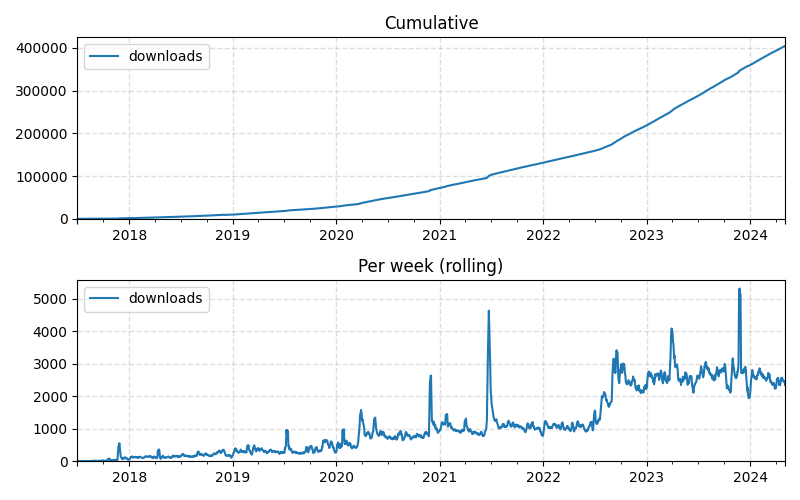
Cumulative and weekly desktop downloads from GitHub Releases. Live chart on the stats page.
Help us finish it
aw-tauri is still in active development and contributions are welcome and encouraged! More eyes on the code will be beneficial to the project.
Check out the README to see the status of development, and where you can help out. Open items include a settings UI, downloading watchers on demand, the updater, and code signing (see the issues).
We are hopeful that it will help solve many of our remaining challenges, and are excited to see it help shape the future of ActivityWatch.
Thanks to Brian Vuku (0xbrayo), the main author of aw-tauri, who wrote the original version of this post.